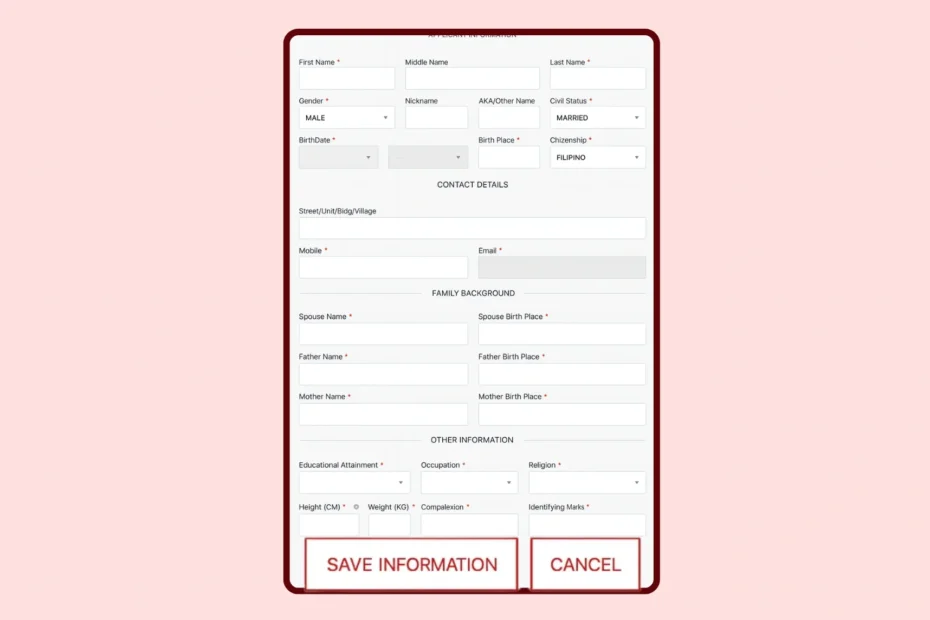
Having accurate details on your National Bureau of Investigation (NBI) clearance is crucial. Employers, government agencies, and embassies rely on this document to verify your identity and background. If your personal information contains errors, it can cause significant delays in job applications, visa processing, or other important transactions.
Fortunately, the process of updating your information is straightforward if you know the right steps to take.
Updating Your Information Online
The easiest time to correct your personal details is before you finalize your appointment and pay the processing fee.
- Log in to your account: Visit the official NBI Clearance Online Services portal and sign in using your registered email address and password.
- Access your profile: Look for the “Edit Profile” button on your dashboard.
- Make your changes: Carefully update the necessary fields. You can correct spelling errors in your name, update your address, or change your civil status.
- Save your updates: Click the “Save” button to apply the changes to your account.
Note: Once you generate a reference number and pay the fee, the system locks your online application form. You cannot make further edits through the website for that specific transaction.
Updating Your Information In Person
If you notice a mistake after you have already paid for your appointment, do not panic. You can still correct the information on the day of your scheduled visit.
- Attend your appointment: Go to your chosen NBI branch on your scheduled date and time.
- Proceed to the encoding section: When it is your turn for data capture (photo, fingerprinting, and signature), immediately inform the NBI personnel about the errors in your application.
- Request the correction: The encoder will pull up your profile on their system. Tell them exactly what needs to be changed before they print your clearance.
Necessary Documents and Fees
When you request changes during your appointment, the NBI officer will need proof to verify the new information. Always bring two valid government-issued IDs that display your correct details.
If you are requesting a significant change, such as a name correction or a change in civil status, you must bring supporting documents. A Philippine Statistics Authority (PSA) birth certificate is required for name corrections. A PSA marriage certificate is necessary if you are changing your civil status from single to married.
There are no additional fees for correcting your information during the encoding process. However, if you fail to notice the error and the NBI prints your clearance with incorrect details, you will have to start a new application and pay the standard clearance fee all over again.
Tips to Avoid Common Mistakes
- Match your IDs: Ensure the name you type into the online portal perfectly matches the name on the valid IDs you plan to present.
- Watch for typos: Simple spelling mistakes in your name or birthdate are the most common reasons for clearance delays.
- Use an active email: Register with an email address you check regularly, as this is where you receive your reference number and appointment confirmation.
Double-Check Before You Submit
Take your time when filling out your NBI clearance application. Rushing through the forms often leads to mistakes. Before you click the final submit button or pay your processing fee, review every single field. Taking an extra minute to double-check your personal information will save you from unnecessary stress and ensure a smooth appointment experience.